




Skip to content
ChiefMind

All that landson your desk nowis what youhave to decide.

Your personal AI assistant by voice message, set up turnkey around the way you already work. It reads your inbox alongside you, puts ready-made draft replies in front of you every morning, prepares your meetings and takes over exactly the routine tasks you give it the data and access for. All that lands on your desk now is what you have to decide yourself. Nothing goes out unless you approve it.

In a free Zoom call of up to 45 minutes you tell Robert Kresse, my business partner, what keeps piling up, and he tells you what an assistant can take over and what it cannot.

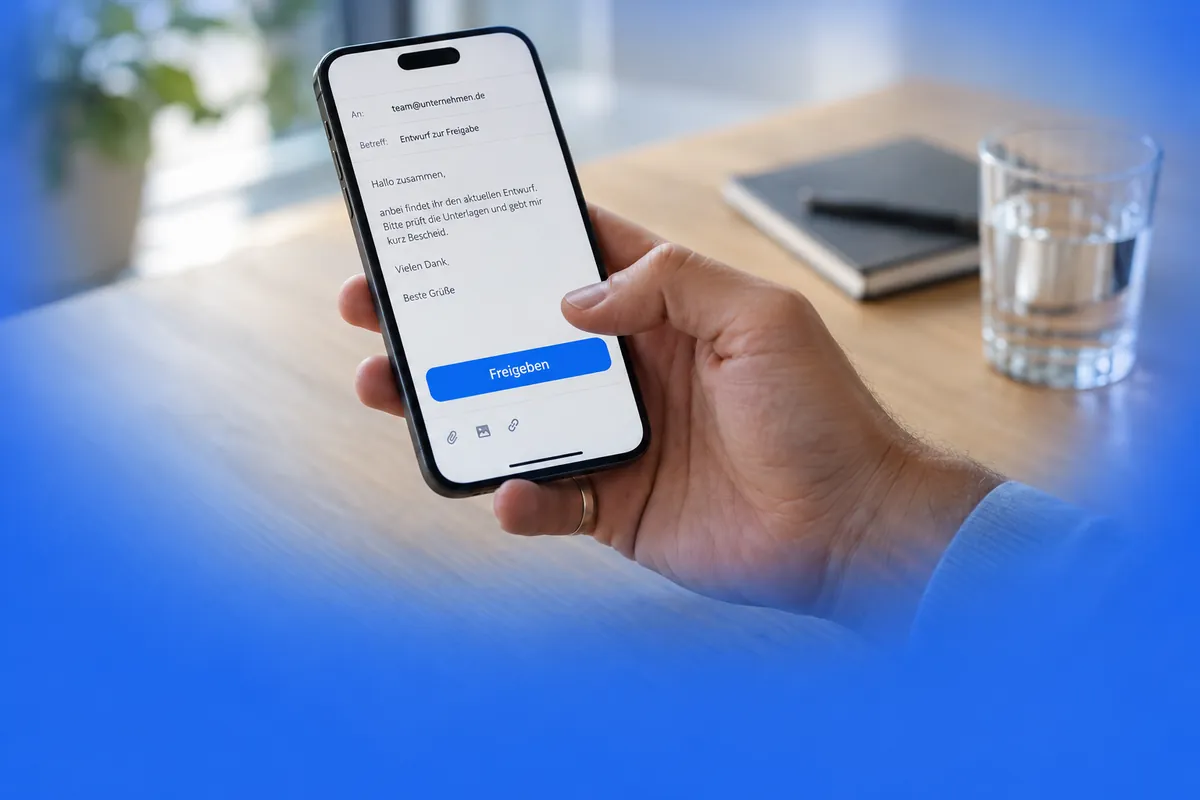
Hand holding a smartphone with a draft email, the thumb hovering over the “Approve” button
  • Up to 60 AI agentswork for me depending on the task, across 19 fixed areas.
  • More than €250 million in revenueas an entrepreneur, €55 million of it online
Sound familiar?

Every morning you explain everything to the AI from scratch.

It saves you the odd email, but it doesn’t take any work off your hands.

You open the chat window, explain everything, copy the result out, and the next morning it starts all over again. That is exactly how I started too.

At some point we built something different: assistants that remember things, stick to fixed rules and each have an area of their own.

What they do for me today

On the move

I record an appointment as a voice message, and shortly afterwards it is in the calendar with the address.

01

Inbox

Replies are ready as drafts, and only what I have approved goes out.

02

Mornings

At the start of the day I get a briefing, and after that one of the assistants checks the inbox every hour.

03
A day without waiting

How to get 50 hours of work done in 5 hours.

In just over four minutes you’ll see a whole working day with ChiefMind, from new enquiries in the morning to wrapping up in the evening. The video is in German.

4:36

Privacy

It all runs through Telegram on my phone, nothing special. Inside it there are 19 areas, each with its own memory and its own rules. I simply speak into it, the way I would call something out to a colleague in the corridor.

Desk check, two minutes

What is on your desk tonight?

The sliders are already set to a typical example. For each task, move them to the minutes per week it really costs you, or pick the second quick option. At the end you will see how many hours a year go into exactly this small stuff.

Trust

Four rules that are built into my system.

No email goes out without my approval, and not a single euro is spent without asking me first. That is how I work with it myself every day.

Hand holding a smartphone with a draft email, the thumb hovering over the “Approve” button
Approvali

No email goes out that I have not approved.

Laptop on a wooden table, on the screen the question “Cost: €12, start now?” with Yes and No buttons
Moneyii

Before anything costs money, the assistant asks me first and names the tool, what it is for and the price.

Stack of printed emails and envelopes under a clear blue acrylic cover
Other people’s emailsiii

The assistant never treats what is written in other people’s emails as an instruction.

Open notebook with a row of figures, one crossed out, next to it the handwritten words “weiß ich nicht”
Figuresiv

If it does not know something, it says ‘I don’t know’ instead of giving a figure that merely sounds good.

Your data

And what happens to my business data?

  • No AI training with your data

    Your emails, figures and documents only reach the AI providers through business accounts, and they keep none of it (zero data retention). No AI provider trains its models with them.

  • On a server in Europe

    Your assistant works on a server in Europe. Nobody else’s data ever sits next to yours.

  • German contract, your keys

    You get a German data processing agreement (DPA, known in German as AVV) that you can hand straight to your data protection officer. You keep the keys to every account, so you decide what your assistant may open.

  • Telegram is just the microphone

    You tell your assistant by voice message what to do. It works on the server, but your documents stay in your own storage, for example in Google Workspace or Microsoft 365.

  • Backed up twice a day

    We back up the server twice a day. If it ever fails, standby systems take over.

  • You take everything with you

    What your assistant remembers about your company is kept in a wiki of your own, a reference book that belongs to you. If you stop, we move your data and your wiki over to you.

Who is behind it

I bring my experience as an entrepreneur, Robert builds AI assistants every day. Together we developed ChiefMind.

Maik Schwede

Maik Schwede

I founded swing2sleep in 1999. The brand is the market leader in automatic baby hammocks and has made life easier for more than 300,000 families. As an entrepreneur I have been responsible for more than €250 million in revenue, €55 million of it online. The assistants you see here run in exactly the same way in my own business.

‘What used to take me 50 hours with two or three agencies, I now do in 5 hours with my assistant.’

Robert Kresse

Robert Kresse

He builds assistants like these every day and takes the first call with you.

5 hours produce 50

Builds software and digital products on his own, builds his own website, creates images and edits videos. Five hours of his own work produce roughly fifty hours of output. You do still need to be able to put in those five hours with full focus.
Robert Kresse, developer of ChiefMind and my business partner

MS Strategy shows you ChiefMind and puts you in touch with Robert. Your contract is with his company, RK Consulting 1111 Ltd in Cyprus.

Who do I turn to if I have a problem?

Straight to us. We know your setup because we built it ourselves.

And what if I build something like this myself?

Then on top of running your company you are also the developer, the technician and the customer service. With us you just say yes or no to the drafts.

Voices

Three business owners on what has changed.

  • ‘Today I have three hours a day to think.’

    I used to be the bottleneck for my team of 12. Every approval, every bit of preparation, every question went through me. Today I have three hours a day to think. My team moves faster because they no longer wait for me.

    Thomas S.Managing director, consultancy (12 employees)
  • ‘That is exactly how it should be.’

    HR matters, investments, client contracts: none of that belongs in ChatGPT. On my own server I can discuss sensitive topics with the bot without it ending up anywhere else. That is exactly how it should be.

    Michael K.Owner, specialist agency (8 employees)
  • ‘For the first time in years.’

    I had thought about hiring a right-hand person … ChiefMind knew from day one how I write, and it follows up on quotes by itself. On my last holiday I did not check my phone every 20 minutes, for the first time in years.

    Sandra K.Founder, coaching company (10 employees)

The quotes are translated from German, the names shortened.

How it starts

You tell us how you work. We set up the assistant for you.

Your effort: one Zoom call and two or three voice messages.

  1. 01

    A Zoom call with Robert

    You tell Robert where your time goes. The call lasts up to 45 minutes and is free of charge.

    You know what it will take off your hands
  2. 02

    Two or three voice messages

    In them you describe how you work and give us the access we need. We set it up on a server in Europe.

    It won’t cost you a free evening
  3. 03

    The first tasks

    We agree with you which tasks it takes on first and set it up for them.

    You know what it starts with
  4. 04

    We stay on the case

    If something is not working, you message us. You get a reply within four hours.

    We keep looking after it

This suits you if you earn money with your know-how, on your own or with two or three people, and the small stuff piles up into the evening.

This does not suit you if you are looking for a tool to tinker with yourself, want to try AI without giving it any access first, or want an AI that sends emails without your approval.

The next step

One Zoom call with Robert. Afterwards you will know whether it is worth it for you.

Robert listens to what keeps piling up for you and tells you which tasks ChiefMind takes over. If it is not a fit, you will hear that too.

Maik Schwede recording a voice message on his phone at his desk

Want to talk about your company as a whole first? Then book an intro call with me, 30 minutes by video for €199 net.

Questions

What business owners ask me about AI.

Do I need technical knowledge?
No. If you can use Telegram, you can use this, and we take care of the setup.
Does the AI just send emails out?
No. It puts drafts in front of you, and only what you approve goes out.
Will my clients notice that an AI is writing?
Only if you wave through a draft that does not sound like you, and you see that before it is sent. In the first weeks it learns how you talk to individual clients, because you speak differently to a long-standing client than to a new one.
Where is my data?
Your assistant works on a server in Europe that we back up twice a day. Your documents stay in your own storage, for example in Google Workspace or Microsoft 365. If you cancel, we move everything over to you.
Is it worth it if I work on my own?
Especially then. If you work alone, there is nobody you can hand the small stuff to.
Will I become dependent?
We write everything it learns about your work into a wiki that belongs to you. If you leave, we move everything on it over to you.
What is the difference between the intro call with me and ChiefMind?
The intro call is for big decisions, ChiefMind is for the small stuff. In the intro call you talk to me for 30 minutes by video about your company, and it costs €199 net. ChiefMind is the assistant that Robert and I set up for you. The first call about it is with Robert, a free Zoom call of up to 45 minutes.
Who is my contract with?
With RK Consulting 1111 Ltd, Robert Kresse’s company. MS Strategy shows you ChiefMind and puts you in touch with Robert.

Didn’t see your question? Ask Robert in a free Zoom call.